


Wisconsin State Journal News
2.8297.00 Reviews
App Specs
- Version
- 9.22
- Updated On
- License
- Free
- Downloads
- 10,000+
- Developer
- Lee Enterprises
- Categories
- News & Magazines
- Platform
- Android
Screenshots



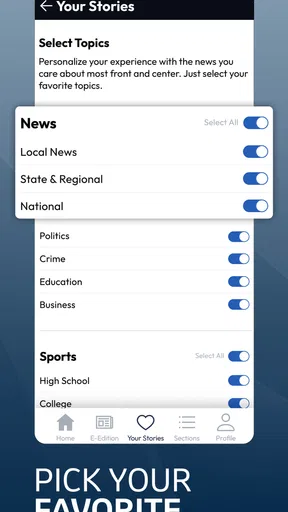
 Analysis by AppCompare
I spent time with Wisconsin State Journal News as a local news app for the Madison, Wisconsin area, and my overall impression is fairly specific: it is most useful when I want reporting tied closely to one community, not when I am looking for a broad national news dashboard. That focus gives the app a clear purpose, but it also means the experience depends heavily on whether Madison-area coverage is what I need that day.
The app is free to install, although it includes in-app purchases ranging from about twenty-seven dollars to around three hundred twenty-five dollars per item. That makes it important to understand what kind of reader it serves before treating it as a general-purpose news replacement. I would recommend trying it for local awareness, especially if Madison is home, work, family territory, or a place I follow regularly. I would be more cautious if I wanted a polished, wide-ranging news reader with extensive customization.
How the app handles reading, navigation, and everyday access
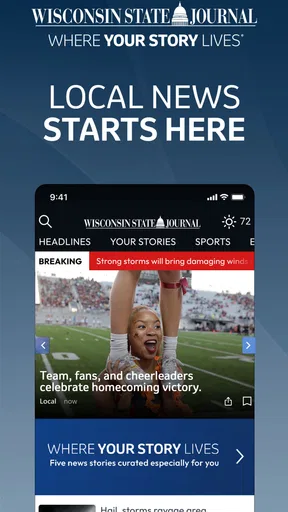
I find that the app’s local focus is most useful when I treat it as a deliberate check-in, not an endless feed. In this section, I look at how that choice affects moving between headlines and longer stories, and why it helps to test a full reading session on your own phone before making it part of your routine.
A local-first layout is easier to understand when Madison is your priority
The strongest accessibility decision in this app is its editorial focus. Instead of asking me to sort through a huge mixture of world, national, business, entertainment, and local stories, it is built around the Wisconsin State Journal and the Madison area. That narrower purpose can reduce the mental effort involved in deciding what matters. For a reader who mainly wants nearby developments, community reporting, and regional context, the app has an immediately understandable reason to exist.
That same focus can be a limitation for people who need one application to cover everything. I would still need another source for a wider national view or for news from several regions. The app works best as a local layer in a reading routine rather than as the only news product on a phone.
In practical use, I found it helpful to approach the app with a specific habit: open it when I want to catch up on Madison, scan the available headlines, and then leave rather than expecting an endless stream of unrelated material. This is a small but useful distinction. A local news app can feel less overwhelming when I treat it as a check-in tool instead of a social feed.
Readability depends on the phone and the reader’s preferred settings
News reading is not equally comfortable for everyone. People with reduced vision, reading fatigue, dyslexia, or sensitivity to dense screens often need more than a list of headlines. Text size, contrast, spacing, and the amount of visual clutter all affect whether an app is genuinely usable. I would not assume that a familiar newspaper brand automatically solves those needs.
Worth Reading Before You Choose

EA SPORTS FC Mobile 26 Is a Bigger Football Game, but It Takes Time

Flipboard Shows What News Apps Must Do Beyond the Feed

Switching to Android Auto Means Rethinking Your Driving Routine

Google Calendar Makes a Crowded Week Easier to Manage

Ludo King Makes the Most of the Minutes Between Plans

Baby Panda World Brings Quick Play to Modern Phones, but Its Game Library Feels Busy
My practical advice is to test a few different story types rather than judging the app from its first screen. A short breaking-news item may be easy to scan, while a longer report can expose problems with paragraph density or scrolling comfort. I would also check the phone’s own display and text settings before deciding that the app itself is difficult to read. Larger system text, increased contrast, or a less distracting display mode can make a meaningful difference, though the result will vary by device.
For readers who prefer listening instead of visually scanning a screen, the decision is less straightforward. I would not choose this app solely on the assumption that every story will offer a convenient spoken version. Someone who relies on text-to-speech should test a complete article and confirm that the phone can move through the content in a sensible order. If that workflow feels awkward, a browser or dedicated news-reading tool may be more dependable.
Navigation rewards a deliberate reading routine
One of the less obvious trade-offs is that a focused local app may be easier to browse but less satisfying for discovery. I can open it with a clear question—what is happening around Madison?—and avoid the distraction of a broad recommendation engine. On the other hand, readers who enjoy discovering related topics, following national context, or building several custom news streams may find the experience narrower than expected.
I recommend using a simple routine for better results. First, scan the main headlines without opening everything. Next, choose one or two articles that directly affect daily plans, such as transportation, public decisions, schools, weather-related developments, or community events. Finally, return later only if I have a reason to check for updates. This approach saves attention and makes the app more useful for people who become tired when confronted with a constant flow of stories.
That workflow is also helpful for older readers or anyone who finds rapid scrolling stressful. It turns the app into a predictable sequence rather than an open-ended search. The trade-off is that I may miss a story that would have appeared through a more personalized or aggressive recommendation system.
What a realistic day with the app looks like
Imagine I live in Madison and have a busy morning. Before leaving home, I open the app to check local headlines, read one article connected to the day’s plans, and close it. At lunch, I return for a quick update instead of searching several websites. In the evening, I read a longer local report when I have more time. That pattern makes sense because the app’s value comes from repeated, short visits rooted in place.
For a family member who lives elsewhere but wants to keep up with Madison, the same routine can work differently. The app can provide a direct connection to local coverage without forcing that person to follow a large collection of social accounts. However, if the family member wants news from multiple states or expects extensive national analysis in the same feed, this will probably feel incomplete.
People with limited data, limited battery, or limited attention should also think about when they use it. Reading several full articles away from a reliable connection may be less comfortable than saving local reading for home or work Wi-Fi. I would avoid building a critical travel plan around any news app unless I had already checked the relevant information and knew how quickly it updates.
Motor considerations: scrolling, tapping, and fatigue
News apps ask readers to perform simple actions repeatedly: tap a headline, scroll through text, go back, and select another story. That can still be tiring for people with tremors, arthritis, limited dexterity, or temporary hand strain. I found that the best way to reduce friction is to slow down and use the phone’s built-in interaction tools where available, such as larger touch targets, voice control, or an alternative navigation method supported by the operating system.
I would test the complete path from opening a headline to returning to the story list. A screen that seems fine at first can become frustrating if the back action is easy to miss, if scrolling jumps unexpectedly, or if a reader must make many small taps to reach the next article. These are not details I would ignore when recommending the app to someone who uses a phone one-handed or with assistive input.
There is also a posture issue. Holding a phone for a long article can be uncomfortable, particularly for readers with limited grip strength. I prefer short reading sessions, a stand, or a larger screen when I plan to spend more time with local coverage. The app’s local focus supports brief check-ins, so I do not think it needs to be used as a continuous scrolling feed.
Sensory considerations and the value of a calmer news habit
News can be emotionally intense even when the interface is simple. Local stories may concern public safety, schools, government decisions, accidents, or neighborhood disputes. For readers who are sensitive to alarming headlines, a calmer approach matters. I would scan titles first, choose intentionally, and avoid opening every urgent-looking item merely because it is prominent.
The local emphasis can be positive here because it gives the reader a clear boundary. I am not automatically moving from Madison news into a nonstop mixture of global crises, commentary, and viral material. That can make the app easier to fit into a low-stimulation routine. Still, local reporting can be serious, so the reduced scope should not be confused with a guarantee of a gentle experience.
Readers who are sensitive to motion, brightness, or crowded interfaces should evaluate the app on their own device. Phone-level display options may help, but I would not promise that those adjustments will solve every issue inside the app. The sensible test is simple: read a few headlines, open a full article, scroll slowly, and notice whether the screen remains comfortable after several minutes.
Situational access: where the app fits and where it does not
The app is a good match for people who want Madison-area news during a commute, a break at work, or a quiet moment at home. It is especially practical when I want local context without navigating a general search engine. A location-focused news source can also help someone who has recently moved to the area and is trying to understand what is happening nearby.
It is less suitable when I need immediate, highly specialized information from another source. For a national election overview, international developments, financial research, or a complete weather picture, I would use a service designed around that purpose. The app’s strength is not that it replaces every other source; its strength is that it keeps local reporting close at hand.
People who are offline frequently should plan carefully. I would not assume that every article will be available without a connection or that a story opened earlier will remain fully usable later. If reliable access matters, I would test the app in the exact situation where I expect to use it, such as on public transport, in a rural area, or during travel.
The age rating is Everyone 10+, which makes the app broadly appropriate for older children and adults, but that should not be read as a promise that every news topic will feel suitable for every family. News content changes with current events. Parents or caregivers who want tighter control over what a child reads should remain involved rather than relying only on the rating.
Who benefits most from the local focus
I see the clearest value for Madison residents, people with close ties to Wisconsin’s capital, and readers who care more about nearby reporting than about a large national feed. It can also suit someone who dislikes social media as a news source and wants a more direct way to check local coverage.
It may help caregivers or relatives who want to discuss local developments with someone in the area. A shared local reference point can make conversations easier, particularly when one person is not physically nearby. That said, I would still verify important practical details through the relevant official source before acting on a news report.
The app is not my first recommendation for readers who want extensive personalization, many regions in one place, or a single dashboard combining local, national, and international reporting. A general news aggregator may be better for that audience, while a newspaper website may be preferable for readers who want to compare coverage across sources.
Remaining barriers: cost expectations and reader confidence
The free installation lowers the barrier to trying the app, but the presence of substantial in-app purchase options means I would pay attention during the first setup and reading sessions. I would not assume that every part of the experience is included simply because the app itself is free. Before committing to a purchase, I would make sure I understand what it unlocks and whether it matches how often I expect to read.
This matters particularly for casual readers. Someone who checks Madison headlines once a week may not receive enough value from a paid option to justify it. A frequent local-news reader may feel differently, especially if the app becomes part of a daily routine. The right decision depends on reading frequency and the importance of this particular coverage, not just on the download price.
The average rating is 2.8 from around six hundred ratings, with close to three hundred written reviews. I treat that as a reason to approach the app thoughtfully rather than as an automatic rejection. Ratings can reflect different devices, expectations, subscription experiences, and periods of use. Still, the score signals that I should test navigation, article access, and purchase boundaries personally before recommending it to someone who needs a friction-free experience.
The app comes from Lee Enterprises and has been available since August 2010, so it is tied to a long-running newspaper identity rather than a new experimental news brand. Its current version is 9.22 and it requires Android 8.0 or later. Those details are useful when helping someone with an older phone: compatibility should be checked before planning to install it, and a device that cannot meet the operating-system requirement will need another way to read the coverage.
Another barrier is source dependence. A local newspaper app can be valuable, but no single publication should be the only basis for urgent decisions. I would compare important claims with official notices or another reputable source, especially for emergencies, closures, public services, or rapidly changing situations. That is not a criticism unique to this app; it is a sensible habit for local news in general.
How it compares with websites and broader news apps
Compared with opening a newspaper website in a mobile browser, a dedicated app can make regular check-ins feel more direct. I do not have to begin with a search, and the app presents itself as a local destination. The browser alternative may be better for people who avoid installing apps, switch between many publications, or want to use the same reading method across devices.
Compared with a general news aggregator, this app offers a clearer geographic identity but a narrower range. An aggregator is usually the better choice when I want several perspectives, national headlines, or topic-based discovery in one place. The trade-off is that a broad feed can require more filtering and can bury local reporting under stories with much larger audiences.
Compared with social media, the app is a better starting point when I want journalism rather than a stream shaped by reactions and reposts. Social platforms may surface local information quickly, but they can also mix rumor, opinion, and incomplete context. I would use social media to notice what people are discussing and a local news source to read fuller reporting, not treat the two as interchangeable.
My inclusive verdict for Madison-area readers
I think Wisconsin State Journal News is worth trying if local Madison coverage is the main reason I read news. Its focused purpose can reduce distraction, support a predictable check-in routine, and make nearby reporting easier to find than it would be in a huge general feed. For readers with limited attention, that narrow scope may be a genuine advantage.
My recommendation comes with conditions. I would test the reading experience using the phone’s accessibility settings, try a full article rather than only headlines, and confirm that navigation is comfortable with the way I hold and control my device. I would also review any purchase prompts carefully and keep another source available for broader coverage or urgent confirmation.
The app is most inclusive when it is treated as one focused local-news tool, not as a complete answer for every reader or every situation. It can serve Madison residents well, but readers who need extensive customization, offline certainty, multiple regions, or guaranteed support for a particular assistive workflow should compare it with a browser, an aggregator, or another publication before settling on it.
For me, the final choice is straightforward: I would keep it in a local-news routine if Madison matters to my daily life, while using other sources for national range and verification. That balance respects what the app does best and avoids asking it to solve needs it was never designed to cover.
Pros
- Covers Wisconsin politics
- local events
- sports
- and community news.
- Offers in-depth reporting beyond brief headlines and social media posts.
- Useful for readers who want strong coverage of Madison and surrounding areas.
- Digital access makes the publication convenient to read on mobile devices.
- Subscription may include access to the newspaper’s broader online archive.
Cons
- Many articles may require a paid subscription after limited free access.
- Coverage is primarily Wisconsin-focused
- with less national or international news.
- Some users may find the app’s layout less engaging than modern news platforms.
- Frequent notifications can feel excessive if alert settings are not adjusted.
- Loading times and performance may vary on older phones or slower connections.
FAQs for Wisconsin State Journal News
What is the Wisconsin State Journal News app?
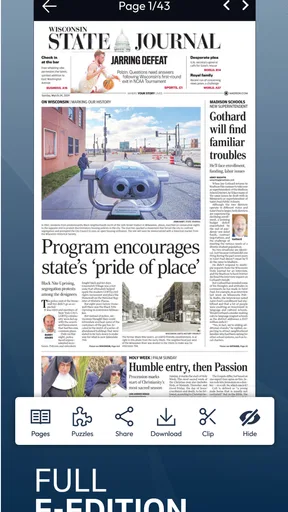
Wisconsin State Journal News is a digital news app focused on Madison, Dane County, and communities across Wisconsin. It provides access to local reporting, state politics, sports, business, entertainment, opinion, and breaking news. After installing it, readers can browse the latest headlines, open full stories, and use the app as a convenient alternative to visiting the newspaper’s website in a mobile browser.
Is the Wisconsin State Journal News app free to download and use?
The app can generally be downloaded at no cost, but free installation does not necessarily mean that every article is available without limits. Some stories or features may require a subscription, account, or digital access plan, depending on the publisher’s current policy. Before downloading, users should check the app-store description and subscription terms, especially if they want unlimited access to premium or subscriber-only content.
Does the app require a subscription to read all of the news?
A subscription may be required for unlimited access to the Wisconsin State Journal’s full content. Readers can often view selected articles or headlines without subscribing, while premium stories, archives, and certain digital features may be restricted. Subscription prices, trial periods, and renewal conditions can change, so it is important to review the in-app purchase screen carefully and cancel through the appropriate app-store settings if necessary.
What type of news and features can users expect?
The app is designed for readers who want strong local coverage, including Madison-area news, Wisconsin government, schools, crime, transportation, community events, and regional issues. It may also include sports coverage, weather information, editorial content, photo galleries, and breaking-news notifications. The exact sections and tools can vary after updates, but the main advantage is having Wisconsin-focused journalism organized in one mobile application.
Does Wisconsin State Journal News send notifications and work offline?
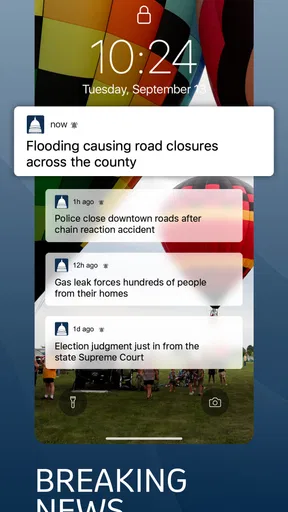
Users may be able to enable push notifications for breaking news, major local developments, sports updates, or other selected topics. Notifications can be changed or disabled through the app and the phone’s system settings. Offline reading is more limited: previously loaded pages may remain temporarily available, but the app generally needs an internet connection to refresh headlines, open new articles, display media, and provide real-time updates.


